

iOS 27: An Overview of the New Parental Control Features
How much time can my child spend on their iPhone? Which apps are suitable? And with whom can they make contact? With iOS 27, Apple significantly expands parental controls and aims to make these decisions easier for parents.
In addition to a revamped Screen Time, new options for websites, apps, contacts, and usage times are being added. Many settings can be managed directly via the child's account and Family Sharing.
We'll show you the most important new parental control features of iOS 27 and explain what changes they bring to family life.
iOS 27: Parental controls become simpler and clearer
Apple focuses the new features primarily on three areas: what content children can use, with whom they can communicate, and when apps are available.
The basis for this remains a separate child account. This allows age-dependent protective measures such as content restrictions, app approvals, and other settings to be managed centrally.
1. Parents can determine which apps are available
Even when setting up a device for a child, parents can more precisely select which apps can be used initially with iOS 27.
Instead of immediately giving the child access to all pre-installed apps, parents can start with a small selection. Additional apps can be added later as needed.
The familiar Ask to Buy feature remains important. Parents can still use it to require approval for new free or paid apps, as well as in-app purchases.
2. New: Approve websites with "Ask to Browse"
One of the most interesting new features is Ask to Browse. This allows parents to require a child to ask for permission before visiting a new website in Safari.
The request is forwarded to the parents and can be approved or denied there. This means that not every possible website needs to be individually blocked or approved in advance.

With "Ask to Browse," new websites require parental approval before access
The feature will be available in Safari on iPhone, iPad, and Mac.
3. New contacts may require approval
Communication can also be controlled more strictly. Parents can already specify with whom a child is allowed to communicate via Messages, FaceTime, or phone.
With the new features, children can, if necessary, send a request if they want to communicate with a new contact. Parents then decide whether this contact is approved.
This is particularly practical because existing contacts can still be used, while new people do not automatically gain access.
4. Communication Safety will also detect violent content in the future
Apple is also expanding Communication Safety. The feature can already detect sensitive content like nudity and blur corresponding images or videos.
With the new features, protection will also apply to graphic or violent images and videos. If such content is detected, the child will first receive a warning before the content is displayed.

Communication Safety in iOS 27 is expanded to include protection against graphic and violent content
5. New time limits for entertainment, games, and social media
Screen Time management is also becoming more flexible. With new Time Limits, parents can set how long certain app categories can be used daily.
The focus here is particularly on:
- Entertainment
- Games
- Social media
During setup, Apple also displays age-appropriate recommendations that parents can use as a starting point and then customize individually.
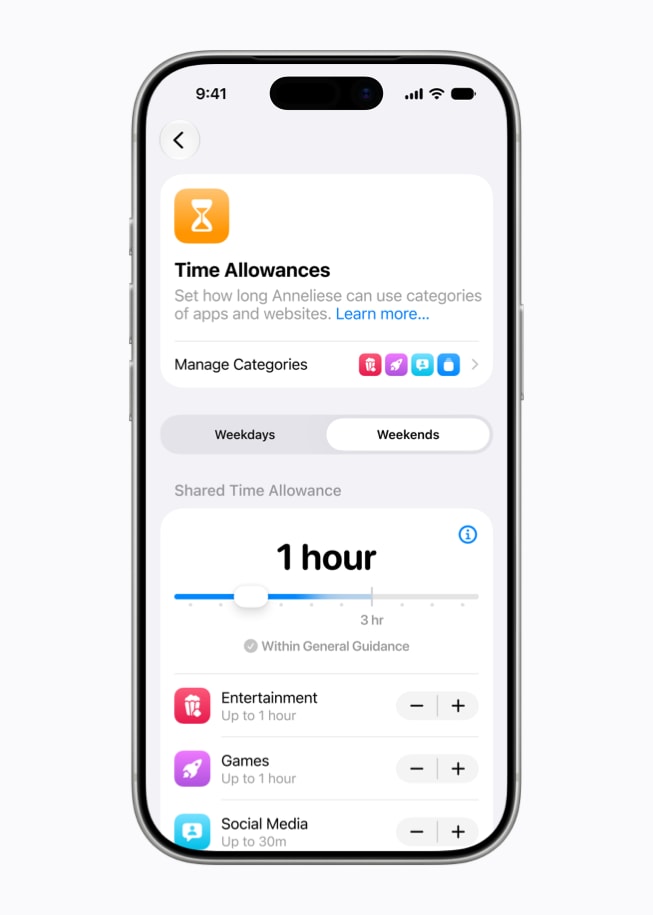
New usage times help to define the daily use of certain app categories
6. Different rules for school, free time, and evening
In addition to daily usage time, parents can also set schedules with iOS 27.
This allows, for example, to determine that only selected apps are available during school hours, while different rules apply in the afternoon or on weekends.
Instead of merely setting a maximum screen time, device usage can therefore be more closely aligned with the child's actual daily routine.
7. Screen Time gets a new overview
Apple is also redesigning Screen Time for parents with iOS 27. The most important information should be visible more quickly.
This includes, among other things, average daily device usage and the most frequently used apps. From there, parents can quickly adjust settings or temporarily restrict access to apps and the internet.
If a child exceptionally needs a little more time, additional usage time can also be easily approved.
When will the new parental control features be released?
Apple has announced the new features for iOS 27, iPadOS 27, and macOS 27. The new software versions are expected to be released in autumn 2026.
Since iOS 27 is currently still before its final release, individual features, names, or settings may change until the official release.
Our conclusion: More control, without having to manage every setting individually
With iOS 27, Apple is not simply expanding existing parental controls with more restrictions. Instead, it aims to make it easier for parents to decide which apps and websites are suitable, which contacts are allowed, and when the device can be used.
"Ask to Browse," the approval of new contacts, and the new schedules seem particularly practical. This allows rules to be gradually adapted as children get older and more independent.
Setting up an iPhone for children correctly
Do you want to set up an iPhone for your child, or are you unsure which settings for Screen Time, Family Sharing, and child accounts make sense?
Simply visit one of our epos branches in Dornbirn, Götzis, or Bürs.
We will be happy to help you with the setup and show you what options your iPhone offers for age-appropriate use.